Showing posts with label Windows 10. Show all posts

15/02/2018

Windows 10 is getting an ‘Ultimate Performance’ mode for power users

Only available in Windows 10 Pro for Workstations

By Tom Warren on February 15, 2018 6:13 am

Microsoft is adding a new power scheme to Windows 10 Pro for Workstations, enabling power users to get more out of their machines. The new mode will be available in the next Windows 10 update, expected to be released in March or April. It’s designed for power users with high performance workstations, and will include special power management features to ensure performance is as best as a system will allow.


“This new policy builds on the current High-Performance policy, and it goes a step further to eliminate micro-latencies associated with fine grained power management techniques,” explains Windows Insider chief Dona Sarkar. “As the power scheme is geared towards reducing micro-latencies it may directly impact hardware; and consume more power than the default balanced plan.”

THIS IS FOR WORKSTATIONS, NOT GAMING MACHINES

Microsoft is not enabling this on battery-powered systems, so this will only be available on high-end workstations. This option won’t be available broadly across Windows 10, either. It’s for Windows 10 Pro Workstations, so you won’t be able to enable it on a gaming machine, although Microsoft already has a Game Mode for Windows 10.

Microsoft first introduced Windows 10 Pro for Workstations last year, and it’s primarily designed for server grade PC hardware and power users. Windows 10 Pro for Workstations scales up for machines with a high number of logical processors and large amounts of RAM, and includes faster file support and low latency options for network adapters.

10/02/2018

Windows 10 is getting a seamless Bluetooth discovery feature as well


Bluetooth doesn't need to be overly complicated and convoluted to set up. A notion that has been recently popularized by both Android and iOS and one that was considered infeasible or at least unlikely by users only a few months ago. Apparently it took a couple of pairs of fancy headphones to get engineers even thinking on the nuisance of Bluetooth connection, most of us never really thought about. But now that we know there's another way, there's no going back! A memo that Microsoft has received loud and clear.


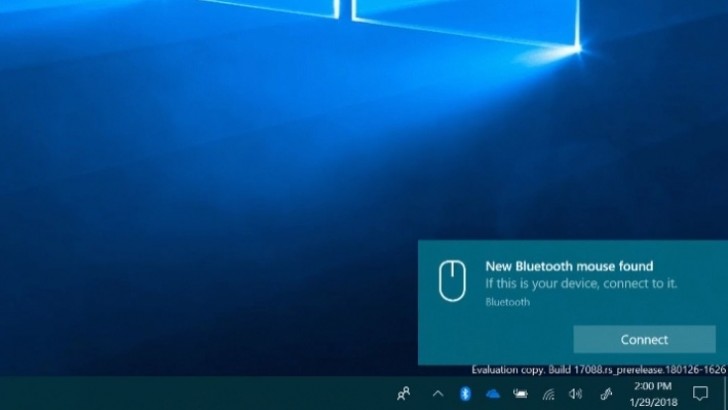
The latest Windows 10 Insider build 17093, released earlier this week, has a convenient automatic sensing feature in place that can pick up new Bluetooth devices as they come near your PC. It's a neat trick and definitely a time-saver, regardless of whether you find yourself searching for the Bluetooth menu every time you get a new peripheral, or are the go-to tech guy for doing the latter on everybody and their aunt's computers on a regular basis.

Just like with Apple and Google's implementations, though, to get the Jedi force sensing feature to work, you need more than the extra code in the upcoming Windows 10 update, expected to arrive in March or April. The client device needs to be compatible as well. The Surface Precision Mouse is the first device enabled with streamlined pairing. But Microsoft has promised the ability won't remain locked in Surface ecosystem alone. To quote a member of Microsoft’s Windows Bluetooth core team:

only certain enabled peripherals can trigger this experience … We are however looking to standardize this in the long term,


The Redmond giant is reportedly already working with Logitech and other major players in the PC peripheral world, so seamless Bluetooth connectivity seems to be on the fast track to prime time.

Source

22/01/2018

Microsoft unveils $200 Windows 10 laptops for schools

Microsoft is taking the fight to Chromebooks with a selection of new sub-$200 laptops and sub-$300 convertible PCs. They come with Windows 10 and are loaded with free software to aid in your studies.
The Lenovo 100e will cost just $190 and is powered by an Intel Celeron (Apollo Lake). The company also has the 300e, a $280 convertible with pen support. The Trigono V401 convertible ($300) supports both touch and pen input while the Classmate Leap T303 laptop ($200) features the added security of Windows Hello.
Lenovo 100e Trigono V401 Classmate Leap T303 
Lenovo 100e • Trigono V401 • Classmate Leap T303

You’re probably wondering about screen resolution, RAM, storage and so on (we are too). The HP Stream 11 Pro G4 EE (which is also a part of the lineup) has an HD screen, 4GB of RAM and 64GB eMMC storage, which we think is a good guideline of the type of hardware on offer.
That said, the software alone could be worth more than $200. There’s Windows 10 for one (though some of these will run 10 S), but also Office 365 with OneNote and Teams. This will make writing and collaborating with your classmates easy.
Microsoft has partnered with multiple companies to offer digital tools to help students learn. From $300 Mixed Reality Headsets to the pricier HoloLens, there will be a VR curriculum by Pearson, the world’s largest education company. BBC will supply Oceans: Our Blue Panet to classrooms and Lego Education will offer a free Hacking STEM lesson plan.
Source