Showing posts with label Google. Show all posts

26/04/2018

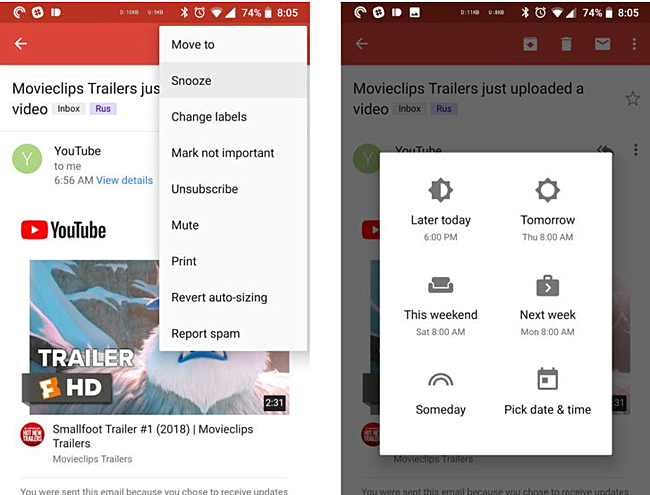
Gmail for Android getting 'snooze' and 'mark unread from here' features

Google just gave Gmail's web UI a major revamp. And now, it's coming to light that the service's Android app has also received a couple of new features: snooze and mark unread from here.
Ability to snooze emails has been one of the highlights of the Inbox by Gmail app, and it's good that the company has now brought over the functionality to the standard Gmail app as well.
For those who aren't aware, using Snooze, you can hide an email until a specific time in future (see screenshot below).
Then comes the Mark unread from here feature, which lets you mark an email thread as partially unread. The feature is helpful when you're going through a long email thread, but don't have enough time to read all of it.
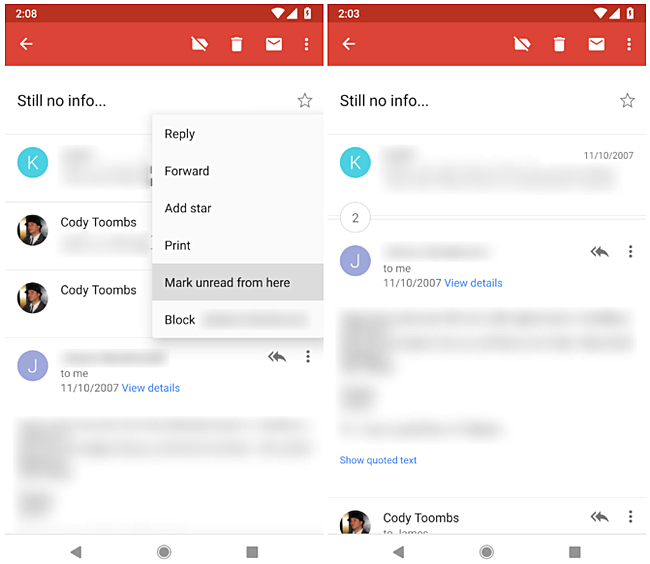
So tapping this option (available in the overflow menu for individual email messages) brings you out of the thread normally, but when you reopen the same email thread, you'll directly see the email you couldn't read last time, along with other unread emails that follow.
These features are currently rolling out, so it may take time before you start seeing them in your app.
Via 1 2

28/03/2018

Google Home gets ability to pair with Bluetooth speaker

When first launched, Google received some pushback about the smart home speakers not being able to pair to an outside audio source like Amazon Echo. There was not even an AUX-out port so you could not even use an external speaker through a traditional 3.5mm jack. You could, however, use audio with a compatible Google Cast speaker or speaker connected to a Chromecast audio.
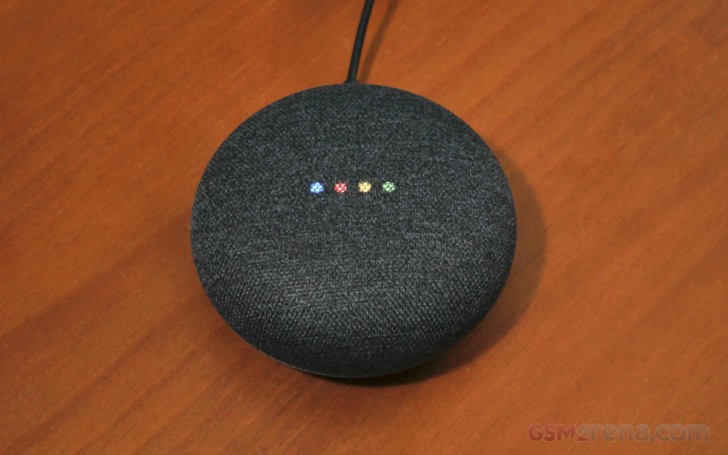
We still get no headphone jack with either Google Home, but Bluetooth support is now coming with the Google Home Mini (or Max). You will be able to pair a Google Home or Home Mini with a Bluetooth speaker so you can listen with a better-sounding speaker.
Google Home Mini
Google Home devices update in the background, so the feature should already be live. To pair to a Bluetooth speaker, "Open the Google Home app, head to device settings and follow the pairing instructions to make it your default speaker." We didn't see this setting on our Google Home Mini, but you should see it soon.
For those with a Google Home Mini, you’ll finally be able to enjoy your music with a better-sounding Bluetooth speaker while still being able to use voice commands.

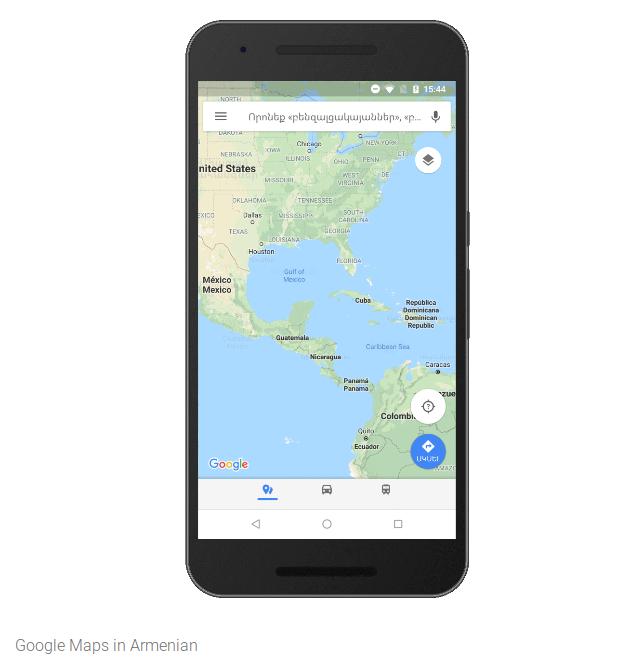
Google Maps updated with support for 39 new languages

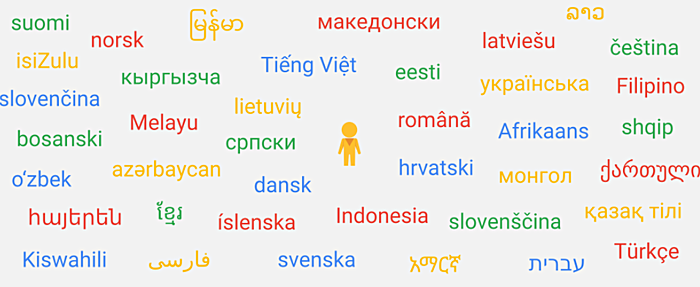
Google has added support for dozens of new languages to its Maps service. A total of 39 new languages have made it to the list, that Google says are spoken by an estimated 1.25 billion people worldwide.
The new entries include Afrikaans, Albanian, Amharic, Armenian, Azerbaijani, Bosnian, Burmese, Croatian, Czech, Danish, Estonian, Filipino, Finnish, Georgian, Hebrew, Icelandic, Indonesian, Kazakh, Khmer, Kyrgyz, and Lao.
Others in the list include Latvian, Lithuanian, Macedonian, Malay, Mongolian, Norwegian, Persian, Romanian, Serbian, Slovak, Slovenian, Swahili, Swedish, Turkish, Ukrainian, Uzbek, Vietnamese, and Zulu.
Source

27/03/2018

Google cracks down on uncertified Android devices by blocking Google Services

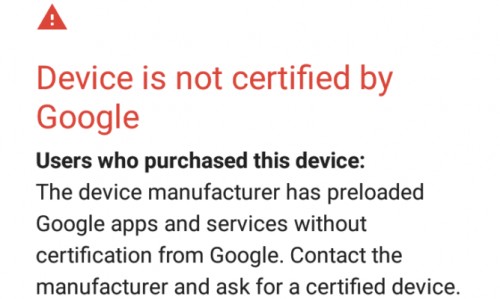
Last week, some users of Android phones reported that they were shown a message, blocking users out of using Google Apps. This was happening particularly to those who were using smartphones with unlocked bootloaders or running a custom ROM.
Today, Google has confirmed to Android Police the statement in which it acknowledged this practice.
Certified Android devices offer users consistent experiences when using apps from Google and the Play Store [… as well as Google Play Protect]. We acknowledge that some manufacturers are building and selling devices that have not been certified by Google.
This means that from now on, devices that are not certified with Google will be explicitly exempted from signing into Google Apps. In order to save them the hassle, some sketchy smartphone manufacturers either don’t adhere to Google’s hardware guidelines or simply would rather not go through the trouble of certifying devices for whatever reasons.
Cost isn’t one of these reasons, as getting hardware certified doesn’t cost manufacturers anything. Some of these manufactures might be more concerned about pumping out low-quality devices and would rather skip out on getting them certified.

This would include smartphones that are running custom ROMs, since they aren’t officially sanctioned by Google. Using a device with an unlocked bootloader might trip Google as well. In order to continue using a device with Google services that is running unofficial software, you will have to acknowledge that your device isn’t certified and Google will let you exempt your device by submitting a request with an IMEI number or the Google Services Framework ID from your phone.
Google will only allow you to use 100 exemptions per Google account, so it’s possible that factory resetting a custom or unofficial ROM will count against your 100 allowed exemptions.
The reason behind Google cracking down on unofficial devices or software is simple. Google wants devices that carry the Android name to consistently adhere to Google’s guidelines. It would also help consumers identify counterfeit smartphones or those that may pose a security threat.
Check out Android Police’s post in the Via link for more specific details on how to exempt an “uncertified” device.

16/03/2018

Google Lens visual search now available on iOS

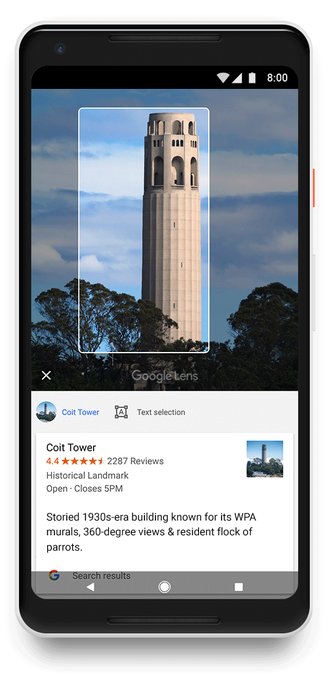
Just like many Google services before it, the Lens visual search platform has been slowly, but surely creeping out of exclusivity status and towards global availability. After first appearing on Google's own Pixel devices, the software has since seen an Android-wide release. Now, as promised, iOS users are getting the feature as well.


It is part of the Google Photos app - an ideal vantage point, from where the visual AI can get at your photos. Most of the magic naturally happens in the cloud, but you need to make sure you have updated to the latest (3.15) version of the Google Photos app.


iOS users should be getting the full set of features. Some highlights include OCR, for things like business cards and reminders, famous landmark recognition. Also, Google has been working on improved support for recognizing common animals and plants, so it will be able to tell different dog breeds apart, for example. We're not exactly sure how far along the latter features are, though.


15/03/2018

Google Assistant speaker and smart display from LG now available to pre-order

During CES 2018, a few OEMs announced their own Google Assistant-powered smart displays that would arrive later in the year to compete against Amazon’s Echo Show and Echo Spot, two Amazon Alexa devices that offer visual feedback rather than audio-only.


These smart displays have a homescreen with basic info. The display offers a very basic UI with controls like brightness, power, and a mute button accessed by swiping up from the bottom.


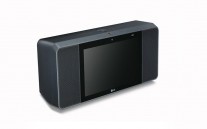
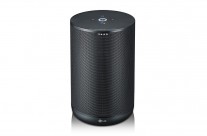
LG's Google Assistant Smart Speakers


LG, Lenovo, and Sony (among others) are going to market and sell these Google Assistant smart displays. Today, LG’s got two Google Assistant devices available for pre-order on B&H Photo’s website – well, kind of.


There are entries for two devices: one is the “LG ThinQ Google Assistant Smart Speaker” listed at $197 while the “LG ThinQ Google Assistant Smart Speaker with touchscreen” goes for $100-more at $297. The former is just a Google Assistant-powered smart speaker made by LG.


While both items are actively available to Preorder from the retailer, the listings offer no product images or estimated ship dates. Both items are listed as “New item – Coming soon”.


Via | Source 12

06/03/2018

Google Lens is now available to everyone on Android through Google Photos

Last month Google unveiled that its Lens feature would become available to all Android and iOS users through the Google Photos app, following an exclusivity period of a few months for Pixels. Today that integration is finally rolling out, with an update to Photos in the Play Store.
With Lens, you can create a contact from a photo of a business card or get more information about a famous landmark that you've captured. That's because Lens understands what you're looking at, and will try to make the most of that. It will soon have improved support for recognizing common animals and plants, so it will be able to tell different dog breeds apart, for example.
Rolling out today, Android users can try Google Lens to do things like create a contact from a business card or get more info about a famous landmark. To start, make sure you have the latest version of the Google Photos app for Android: http://goo.gl/8ZXW7a 
Coming soon to iOS
As you can see from the embedded tweet above, Google says Lens is still in the "coming soon" phase in Photos on iOS.

Via

Google Home devices get hands-free calling in the UK

One of the more interesting features of Google Home devices is the ability to make phone calls by simply asking Google. This feature has been available in the United States for several months now and the UK is the second market to get the feature.
All you have to do is say “Hey, Google, Call Dave” or “Call Mum”. If you’ve never placed a call with Google Home in the past, your device will tell you to go into the Home app and set up voice calling.
Once you confirm your phone number, you’ll get an SMS to confirm that you are the owner of the phone number. This is so when you make a hands-free call, your friends and family will see your phone number in the Caller ID.
Of course, if you have multiple people in your household, Google Home won’t let just anyone make calls. It supports multiple users so when your partner calls their brother Dave, Google won’t call your crazy co-worker Dave.
The feature is rolling out to users in the UK over the next week so do be patient if you don’t get it right away. It might also be a good idea to check that you have the latest version of the Google Home app installed.
In celebration of Mother’s Day in the UK (which is March 11), Google is running a promotion so you can get the Google Home Mini for £10-off from either the Google Store, Currys PC World, John Lewis, or Argos.
Source | Via

05/03/2018

Google is now integrated into the iMessage apps drawer

Search and share in Google without leaving iMessage


By Dani Deahl 


on March 5, 2018 2:19 pm


Google has announced that its app for iOS is introducing several new changes today. The new tweaks are aimed at letting users discover and share information more fluidly across iMessage and the Google app itself.


For starters, the Google app for iOS now supports an iMessage extension that lets users search for and share things like videos, businesses, and more when messaging others. In the example below, icons like “Food” or “Nearby” can be tapped to discover and then share locations directly within iMessage. To the right of the search bar is a dedicated button which switches things into GIF Search mode. If you already have the Google app, as long as you’re updated to the newest version, it should automatically appear in the iMessage apps drawer. For now, this feature is only available in the US.

Image: Google

The company is also building upon the related content feature it introduced last year within the Google app for iOS. Now, the ability to discover related content works with any browser on your device. So if you go to the share sheet from a webpage in Safari, for instance, you can choose to have Google automatically show suggestions for related content without having to perform an additional search. An example, Google says, is looking up how to grill fish. Related information that might be served to you could include “tips for keeping fish from sticking to the grill, info on the best fish for grilling, or delicious recipes.”

Lastly, if you are using an iPad with iOS 11, you can now drag and drop to move text, images, and links to and from the Google app. For example, a simple tap and hold on an article will now allow you to drag the link into other apps like iMessage or Notes.

23/02/2018

Google has planned a big expansion for its Assistant

The fact that Google has planned a big expansion for its Assistant in 2018 was first revealed last week. Back then the number of supported languages was said to be 25 by the end of the year, but today the company has officially announced that Assistant will speak more than 30 languages before we say hello to 2019. That will make it reach 95% of all eligible Android phones worldwide.


The first new languages will be Danish, Dutch, Hindi, Indonesian, Norwegian, Swedish, and Thai, with more coming at some point after that first wave. These will be available both on Android and iOS, by the way.


What's more, Google Assistant will become multilingual later this year, which means you'll be able to speak to it in multiple languages without altering a setting every time you want to switch. It will understand what you say in multiple languages fluently. This feature will first be available for English, French, and German, with support for more arriving "over time".


Perhaps responding to the threat posed to the Assistant's existence by Samsung's Bixby, Google says it's working with phone makers so they can build deeper integrations between the Assistant and device features and develop integration with hardware AI chips. This Assistant Mobile OEM program has been in the works since MWC last year, apparently. Expect to see such integrations from LG, Sony, and Xiaomi soon.


Interestingly, Google has a similar program for carriers, so in the future you'll just ask the Assistant about your plan, add new services (like international data roaming) through its conversational interface, and even get support from your carrier in this manner. Sprint, Koodo, Telus, and Vodafone are already developing such integrations, and more partners will be announced soon.


Over the next week the Assistant will become even smarter, by supporting routines and location-based reminders. Routines help you get multiple things done with just one command. At first six routines will be available in the US, which help with your morning, commutes to and from work, and evening at home. If you say "Hey Google, I'm home" the Assistant can turn on the lights, share any home reminders, play your favorite music and even more.


Location-based reminders are coming to Google Assistant on speakers, they were already supported on phones. Just ask the Assistant in your Google Home to remind you to pick up the milk at the grocery store, and when you arrive there the Assistant on your phone will pop up and tell you to.


21/02/2018

Google's new Android Enterprise Recommended program showcases the best phones for businesses

Today Google has launched a new program called Android Enterprise Recommended. It's a way for businesses to easily choose Android devices to deploy for their employees. To be Android Enterprise Recommended, a handset has to adhere to a strict set of rules.
It must run Android 7.0 Nougat or later, offer zero-touch enrollment with bulk deployment to employees, get the latest security patches within 90 days of their release for a minimum of three years, be available unlocked, and offer a consistent app experience in managed profiles and on managed devices.
Furthermore, it must come with a minimum of 2GB of RAM and 32GB of storage, a 1.4 GHz processor, 8+ hours of active battery life, a 10 MP main camera and 2 MP selfie shooter, and be updated to at least one major new Android version.
To start things off, the Android Enterprise Recommended list of devices comprises the following: Google's PixelPixel XLPixel 2, and Pixel 2 XL; the BlackBerry Keyone and MotionHuawei's Mate 10Mate 10 ProP10P10 PlusP10 Lite, and P smart; LG's V30 and G6; the Moto X4 and Z2; the Nokia 8; Sony's Xperia XZ1XZ1 CompactXZ PremiumXA2, and XA2 Ultra.
As you can see, it's not all flagships, there are a few mid-rangers for eager enterprises to choose from too. More phones should be added to the list in the coming weeks and months. Google says that by the end of the year it will also apply the Android Enterprise Recommended framework to OEMs of dedicated and rugged devices, mobile carriers, enterprise mobility management providers, and systems integrators.
The company is probably hoping to entice device makers with this program to adhere to its rules and thus be featured on the brand new Android Enterprise Recommended website, something that will hopefully lead to more sales of those models.
Source

20/02/2018

Hands-on with Reply, Google’s new smart reply app

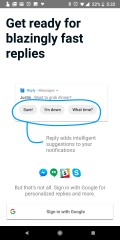
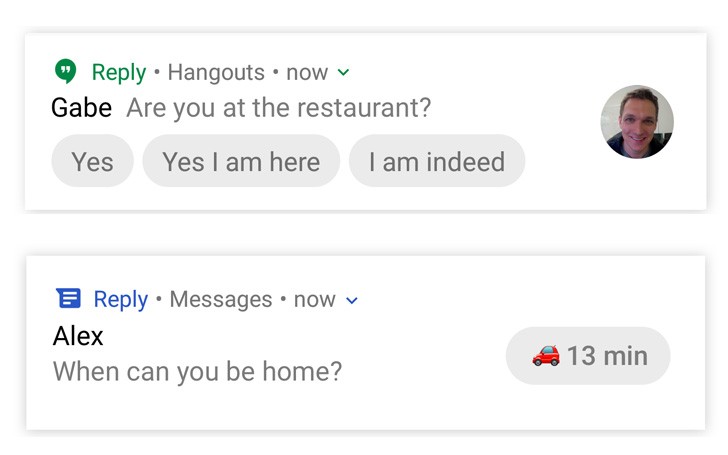
Last week, we reported about one of Google’s newest products being tested at Area 120. The app is called “Reply”and allows Google’s predictive reply algorithm to work with non-Google messaging apps like Whatsapp, Twitter DMs, or Facebook Messenger.


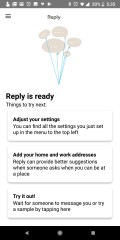
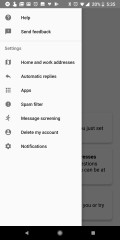
Today, the app has leaked onto APK Mirror where anyone can download and set it up, all you need is to set it up with a Google Account. We’ve set it up on our Google Pixel 2 XL and have gone through the setup so you take a look at what the app offers.


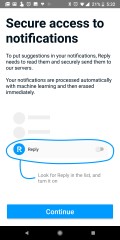
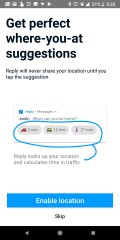
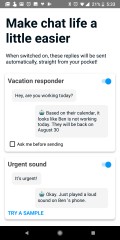
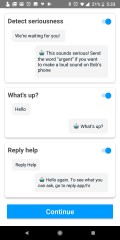
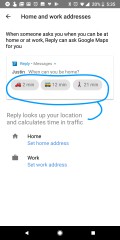
In order for the app to work, it needs permission to see your notifications. Also, for best results, you’ll want to enable location so the app can detect how far you are from work or home for quick replies pertaining to someone asking of your whereabouts or how late you’ll be to work. It can also do vacation replies based on your calendar.


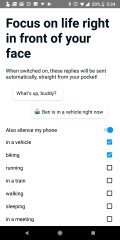
Location can also be used to detect when you’re driving or riding a bike to automatically reply for you that you’re busy and will take a moment before replying. There are more options like ‘on a train’, ‘walking’, ‘sleeping’, and ‘during a meeting’. Actually, the app is not able to know when you’re asleep, but Google included it in there as a way to see how many people select the option, showing interest.


In the event that the app detects you are driving, or riding bike. It will automatically place your device on Do Not Disturb and will send an automatic reply. This reply will start with a robot emoji so the recipient will know it was an automated message.


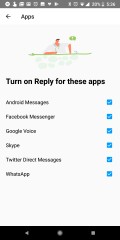
Currently, the Reply app will work with Android Messages (SMS), Facebook Messenger, Skype, Twitter DMs, and WhatsApp. You can sideload the app from APKMirror if you’re feeling up for it.


17/02/2018

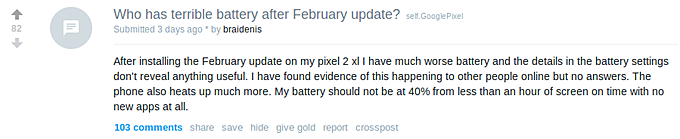
Google Pixel 2 users reporting device heating and battery life issues after February update


Looks like the Pixel 2 February updatehas brought along some major issues. A lot of users, both at Reddit as well as Google's own forums, are complaining about their units getting warm (even with normal usage) and battery draining comparatively faster.


If you take a detailed look at these online communities, there are some users who say they aren't facing any such issues, but their number is pretty small compared to those who are complaining.

And many have confirmed these issues while the device is in safe mode, so the possibility of third-party apps being culprit is clearly ruled out. Google is yet to officially offer a word on the matter.

If you have also been facing similar issues after the latest patch, do let us know in comments below.

Source 1 2 3 | Via

16/02/2018

Google Play Store to expand to 52 countries and 25 languages in 2018

Google has some impressive products like Google Home and the Pixel 2/Pixel 2 XL phones, but the biggest issue is lack of availability on a global scale.


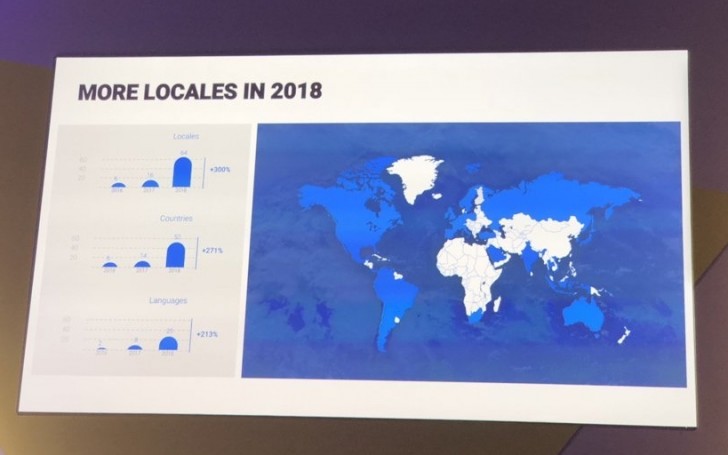
A slide from the Digital News Initiative summit in Amsterdam, Netherlands revealed a map of all the countries and regions Google will cover by the end of 2018, spanning across 54 locales in 52 countries and 25 languages with local support.


The map shows in blue where Google devices and services will be locally available. The graphics, albeit low-quality, reveal that the new countries will be 38, while the new supported languages will be 17.


The list of upcoming markets includes most of South America, Russia, India, South Africa, Saudi Arabia, Turkey, Netherlands, Belgium, Poland, Malaysia and Indonesia.


13/02/2018

Google to expand Smart Reply feature to third party apps

Google's Smart Reply feature might be made into an app that would provide these predictive answers in third party messaging apps. This means that other apps like WhatsApp, Facebook Messenger, and WeChat would be able to offer contextually suggestive answers like on Allo and Inbox by Gmail.
This news comes from Android Police where a reader sent in an email from a department of Google's that tests experimental products. This email was sent to those who signed up to receive such notifications and a sign up form can be filled out to test this new app.
The email outlined a few features of the Reply app. Smart replies can be shown directly in the message's notification for an instant response. It might even add smarter replies like when someone asks for an ETA, Google would be able to calculate it for you.

Other features include Do Not Disturb while driving: Automatically lets those who message you that you can't chat right now. If you get a message with more urgent cues like "We're waiting for you." Reply could notify you, even if your phone is silent. Reply can check your calendar and offer vacation responses, as well.
The app would be compatible with Hangouts, Allo, Whatsapp, Facebook Messenger, Android Messages, Skype, Twitter DM, and Slack.
The feature would take into account the message you receive and scopes out keywords to predictively suggest a quick answer to the email. For example, if "Do you have" starts the email, a few suggestions might be:
  • I don't, sorry.
  • I will have to look for it.
  • I'll sent it to you.
Google first introduced its Smart Reply feature in late-2015 in its Inbox by Gmail app. The feature would later carry on to other apps like Allo, Gmail, and very recently, the default SMS app: Android Messages, though it is still undergoing a pretty slow rollout.
Via |

06/02/2018

Get $200 off a Pixel 2 XL for Verizon from Best Buy

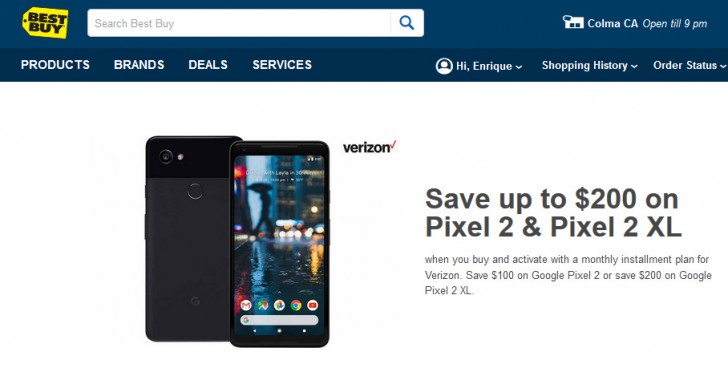
There’s a new deal for those looking to get a new Pixel 2 or Pixel 2 XL. If you’re looking at Verizon, you should head over to Best Buy to take advantage of the following deal.
Save $200 when you purchase a Google Pixel 2 XL on Best Buy’s website with a monthly installment plan on Verizon. You can also save $100 if you purchase the smaller Pixel 2.

The 64GB Pixel 2 normally goes for $27.08 per month. With the $100 off, the payment goes down to $22.91. Meanwhile, the Pixel 2 XL with 64GB of storage normally goes for $35.41 per month, down to $27.07 per month after the discount.
The discount applies to either storage configuration of the Google Pixel 2 or Pixel 2 XL. Just so you know, this deal is only valid at Best Buy in-store or online when you purchase and activate a Pixel 2 on Verizon with an installment plan to pay it off, you won’t be able to buy it in full.
Offers like these are normally for a limited time and the deal can be called off at the retailer’s discretion. Even with the first Google Pixel (XL) last year, Verizon always offered discounts throughout the year. Chances are if you miss this deal, there will likely be a new one rolling around soon enough.
Source | Via

31/01/2018

Google flights can now predict if your flight will be delayed

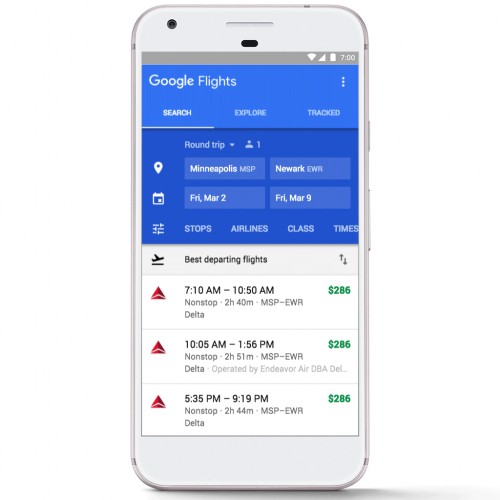
Google’s vast collection of data helps the travel industry with Google’s Hotel search tool and Google Flights. Google is announcing a couple of new features for its plane-ticket search.
Starting with finding cheap flights, Google will begin offering more specific information about cheaper flight fares. New kinds of basic economy flights may not offer a carry-on or the option to pick your seat, so Google Flights will provide this information for American, Delta, and United.

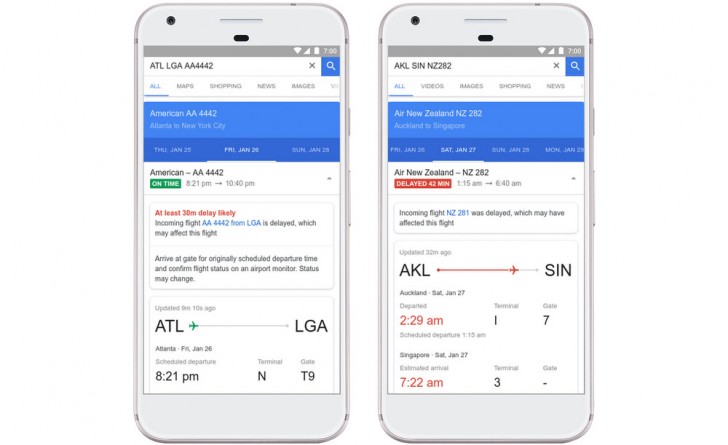
Next, Google will be able to predict when you flight may be delayed. Google uses a combination of historic data and recent flight status information to foresee a flight getting delayed.
Google Flights will also offer information as to why a flight has been delayed to keep passengers informed. Delay predictions will only appear if Google’s algorithms are 80%s sure it will happen.

To look for flight information, just type the flight carrier and flight number or flight route (San Francisco to Hong Kong) into Google and you’ll know all about it.

30/01/2018

Google finalizes $1.1B acquisition deal with HTC

Back in September Google and HTC announced a $1.1 billion deal. The phone manufacturer is receiving the money in exchange for some of its employees and access to its intellectual property. The agreement was approved by the Taiwanese Investment Commission in December, and today Google officially welcomed the new members of its team.
Google officially finalizes the deal with HTC
The deal includes about 2000 engineers who were already working on the Google Pixel 2 smartphone and its upcoming successors. They will remain based in Taiwan and Taipei will become the largest Google engineering site in the Asia-Pacific region.
Rick Osterloh, Hardware Senior VP at Google, commented that the hardware business is entering its third year and the company will keep building and investing for the long run. The company will create “radically helpful experiences for people around the world” with the new teammates, by combining Google’s AI, software and hardware.
Source